Volumes
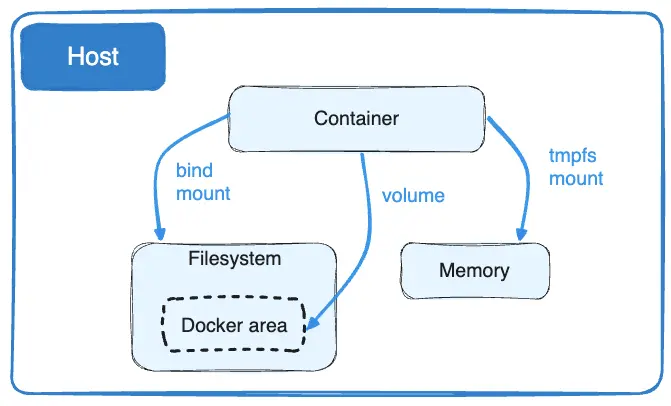
Docker volumes are the preferred mechanism for persisting data generated by and used by Docker containers. Because containers are ephemeral by nature, volumes provide a way to decouple data from the container's lifecycle.
Key Concepts
- Persistence: Data stored in a volume remains intact even when a container is stopped, replaced, or deleted.
- Management: Volumes are fully managed by Docker and are stored in a dedicated directory on the host machine.
- Sharing: Volumes can be safely shared and mounted among multiple containers simultaneously.
Benefits of Using Volumes
- Decoupled Lifecycle: Data is independent of the container.
- Performance: Volumes generally offer better performance than writing directly to the container's writable layer.
- Ease of Backup/Migration: Because volumes are managed directories on the host, they are easier to back up, encrypt, or migrate.
Common Types of Mounts
- Named Volumes: Explicitly created and given a specific name. These are the recommended way to persist data in production.
- Anonymous Volumes: Created automatically by Docker without a specific name.
- Bind Mounts: Maps a specific file or directory on the host machine to a path in the container.
- tmpfs Mounts: Stores data in the host system's memory rather than on disk.
Basic Management Commands
docker volume create <name>: Create a new volume.docker volume ls: List all available volumes.docker volume rm <name>: Remove a volume (must not be in use).